name: agenda class: middle, center # AI SRE Summit 2026 ## Komodor Academy ??? This is the intro slide. Welcome to AI SRE Summit. Talk to the audience, fill time. --- # Schedule and Introductions | Time | Topic | Description | |---------------|------------------|---------------------------------------------:| | 00:00 - 00:10 | Introduction | Overview of the workshop and objectives | | 00:10 - 00:30 | Komodor Overview | Why Komodor? | | 00:30 - 00:45 | Account Setup | Setting up your Komodor account | | 00:45 - 01:00 | Hands-On #1 | Uh oh, what happened to ledgerwriter? | | 01:00 - 01:15 | Hands-On #2 | Customers not seeing new version of frontend | | 01:15 - 01:30 | Hands-On #3 | userservice and accounts-db no longer talking | | 01:30 - 01:45 | Hands-On #4 | What the heck is an OOMKill? | | 01:45 - 02:00 | Hands-On #5 | I promise this is the correct version | | 02:00 - ??? | Conclusion | Thanks for Attending! Q&A | --- # Introduction <span class="chapter-slide">Why Komodor?</span> <div style="text-align: center;"><b>A brief history of <s>the universe</s> Komodor</b></div> --- 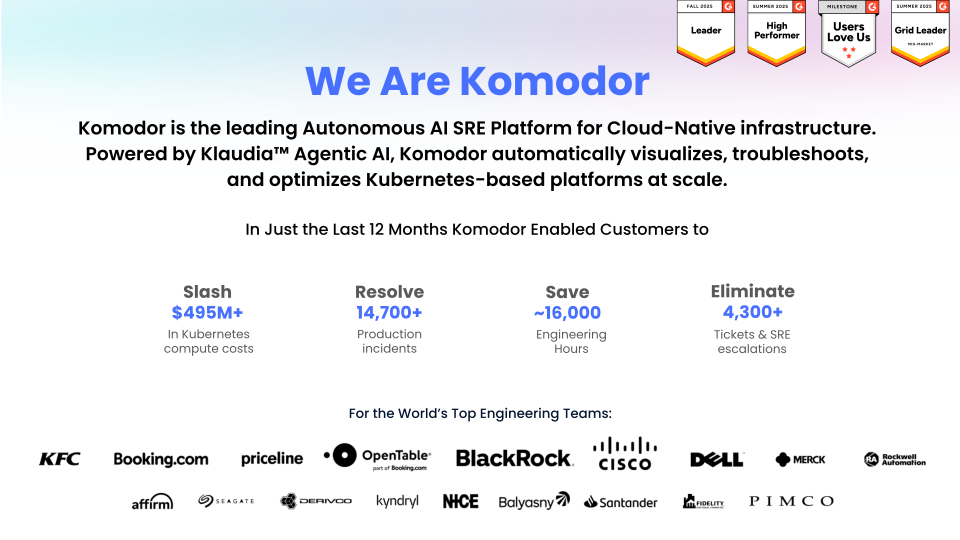 --- 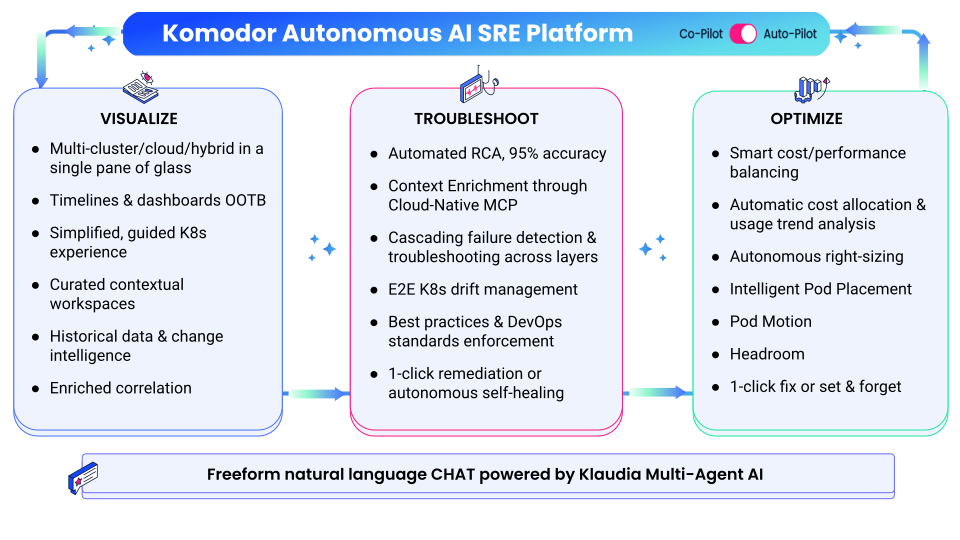 --- 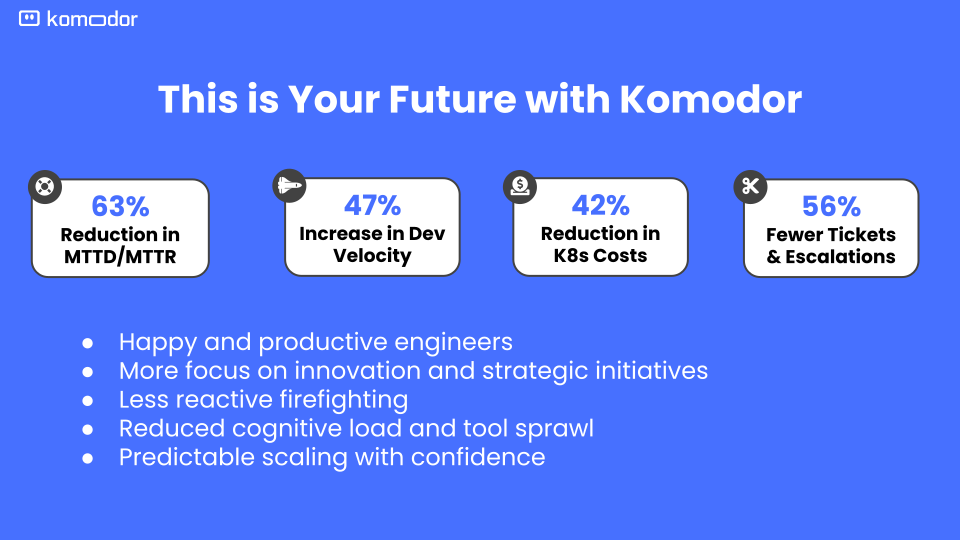 --- class: middle, center ## Komodor Academy Workshops <span class="chapter-slide">Accessing your Lab Instance</span> --- ## Logging into Komodor <div style="display: flex; gap: 1rem; align-items: flex-start;"> <div style="flex: 0 0 70%;"> <img class="column-img" src="/static/content/assets/workshops/komodor-for-leaders/login-uname.png"> </div> <div style="flex: 0 0 30%;"> <br /> <ul> <li>Retrieve the credentials provided by your instructor</li> <li>Navigate to <b>app.komodor.com</b></li> </ul> </div> </div> --- ## Enter your information in the lab's Single Sign On Portal 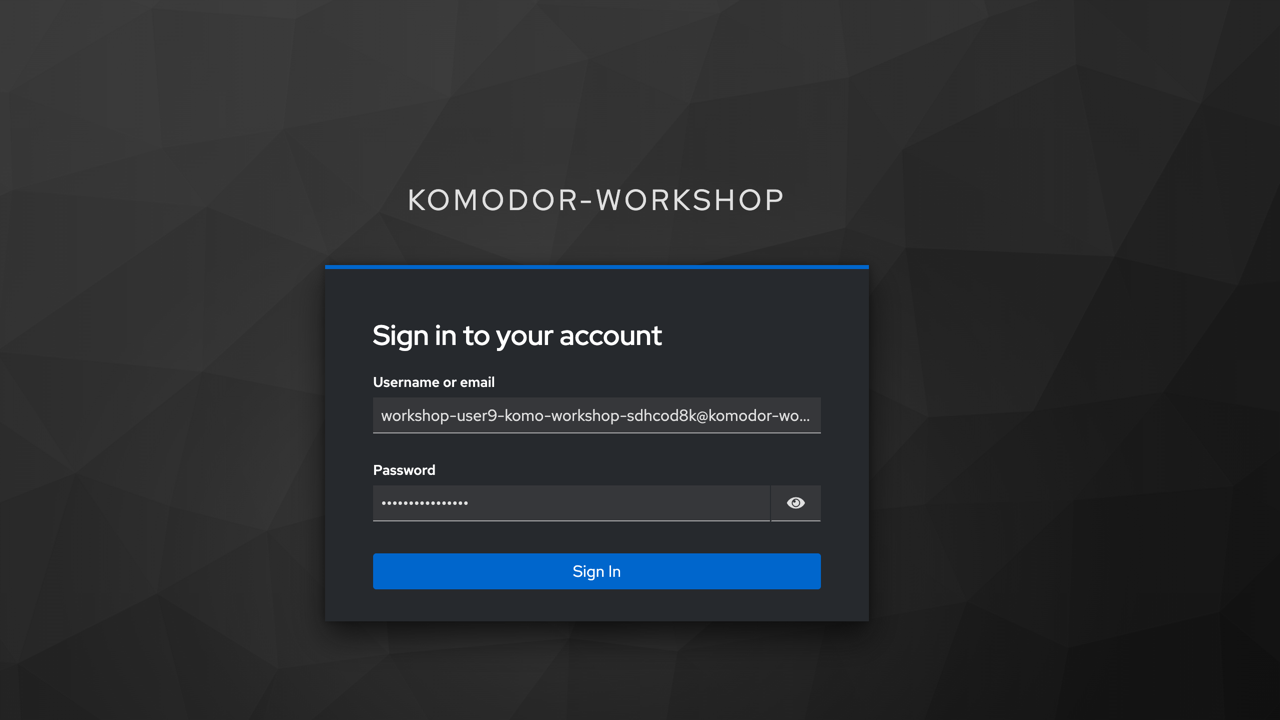 --- ## Observe Bank of Anthos configured for your lab 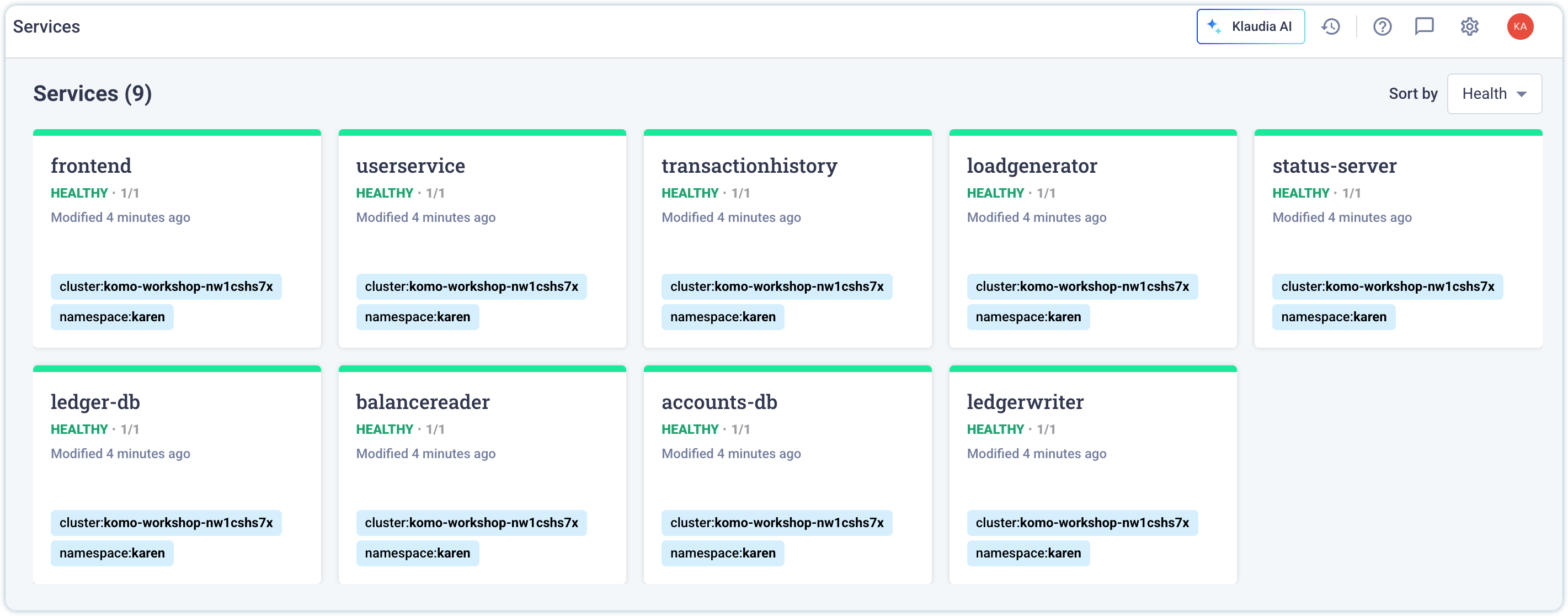 --- ## The frontend service is accessible <div style="display: flex; gap: 1rem; align-items: flex-start;"> <div style="flex: 0 0 70%;"> <img class="column-img" src="/static/content/assets/workshops/all-workshops/boa-deployed.png"> </div> <div style="flex: 0 0 30%;"> <br /> Navigate to <pre>https://$USERNAME.komodor-workshop.com</pre><br /> The application is fully functional, test some transactions after logging in. </div> </div> --- ## Validate the application's frontend is accessibe <div style="display: flex; gap: 1rem; align-items: flex-start;"> <div style="flex: 0 0 70%;"> <img class="column-img" src="/static/content/assets/workshops/all-workshops/boa-logged-in.png"> </div> <div style="flex: 0 0 30%;"> <br /> Bank of Anthos is a full functioning web application with a microservices architecture on Kubernetes. You are the SRE. <br /><br /> Your customers use Bank of Anthos to manage their checking accounts. </div> </div> --- class: middle, center ## Komodor Academy Workshops <span class="chapter-slide">Hands-On Exercises</span> --- class: middle, center ## Komodor Academy Workshops <span class="chapter-slide">Hands-On Exercise 1: What happened to ledgerwriter?</span> --- ## Hands-On Exercise 1: What happened to ledgerwriter? <div style="display: flex; gap: 1rem; align-items: flex-start;"> <div style="flex: 0 0 70%;"> <img class="column-img" src="/static/content/assets/workshops/ai-sre/select-ledgerwriter.png"> </div> <div style="flex: 0 0 30%;"> <br /> <ul> <li>Scenarions in the Workshop are controlled by Jobs in your sandbox</li><br /> <li>Navigate to <i>Jobs</i> in the left navigation menu</li><br /> <li>Select <i>01-ledgerwriter</i></li> </ul> </div> </div> --- ## Hands-On Exercise 1: What happened to ledgerwriter? Cont'd <div style="display: flex; gap: 1rem; align-items: flex-start;"> <div style="flex: 0 0 70%;"> <img class="column-img" src="/static/content/assets/workshops/ai-sre/run-ledger-db-cron.png"> </div> <div style="flex: 0 0 30%;"> <br /> <ul> <li>Select the <i>Run now</i></li> button<br /> <li>This triggers the scenario to load</li><br /> inside the deployment <li>Wait 1-2 minutes for the ledger-db service to come back online</li> </ul> </div> </div> --- ## Hands-On Exercise 1: What happened to ledgerwriter? Cont'd <div style="display: flex; gap: 1rem; align-items: flex-start;"> <div style="flex: 0 0 70%;"> <img style="max-width: 75%; height: auto; margin: 0 auto; display: block;" src="/static/content/assets/workshops/ai-sre/ledgerwriter-unhealthy.png"> </div> <div style="flex: 0 0 30%;"> <br /> <ul> <li>Navigate back to <i>Services</i></li><br /> <li><code>ledgerwriter</code> is now showing red, as an unhealthy service</li><br /> <li>Select the card to enter the service's <i>Events Timeline</i></li> </ul> </div> </div> --- ## Hands-On Exercise 1: What happened to ledgerwriter? Cont'd 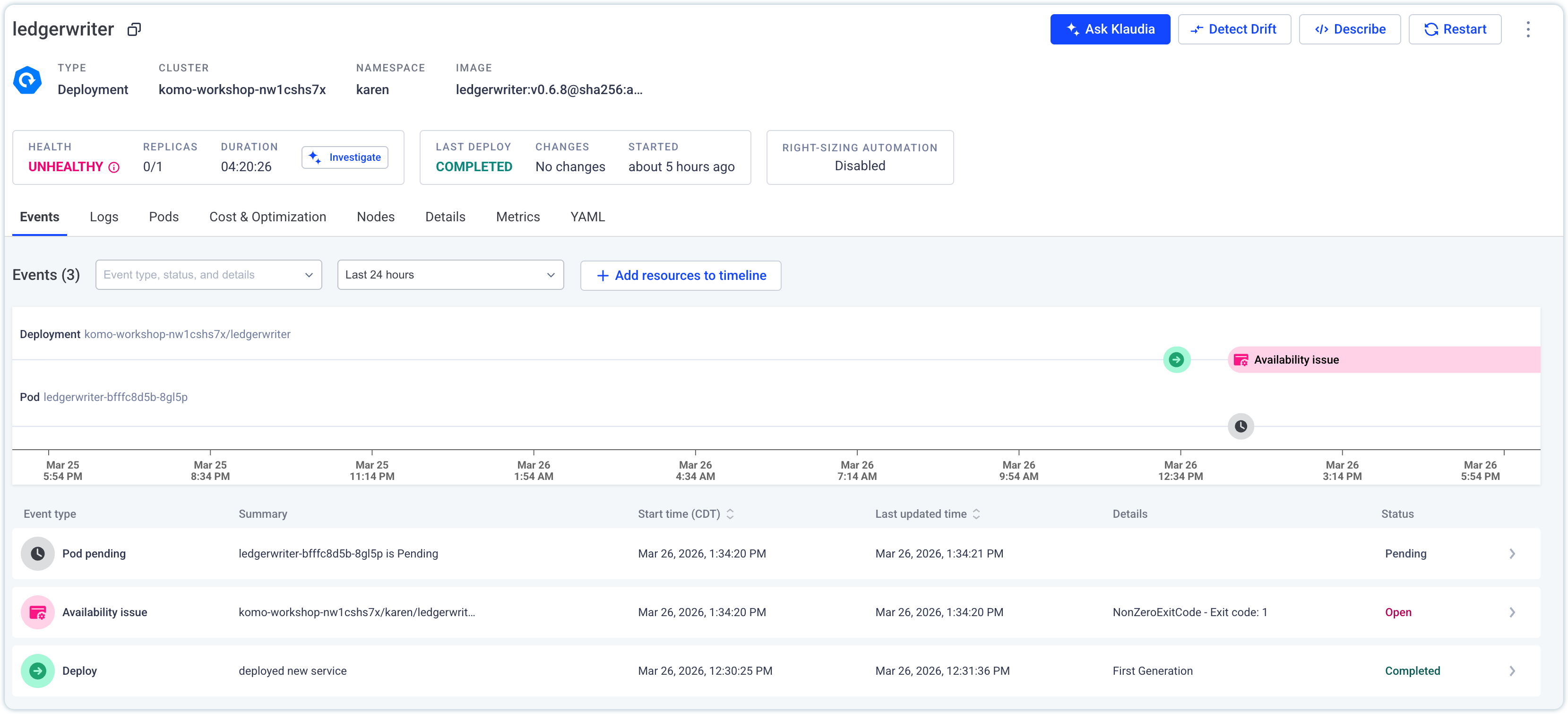 ??? Explain all the parts of the Events Timeline and why it's important. Have the attendee select "Investigate" from the events timeline to begin the Root Cause Analysis --- ## Hands-On Exercise 1: What happened to ledgerwriter? Cont'd <div style="display: flex; gap: 1rem; align-items: flex-start;"> <div style="flex: 0 0 70%;"> <img style="max-width: 75%; height: auto; margin: 0 auto; display: block;" src="/static/content/assets/workshops/ai-sre/ledgerwriter-rca-summary.png"> </div> <div style="flex: 0 0 30%;"> <br /> <ul> <li><i>Investigate</i> triggers a new Klaudia Root Cause Analysis</li><br /> <li>Who, What, Where, When, Why and How</li><br /> <li>Select the tab on the right side to open the Knowledge Graph</i></li> </ul> </div> </div> --- ## Hands-On Exercise 1: What happened to ledgerwriter? Cont'd <div style="display: flex; gap: 1rem; align-items: flex-start;"> <div style="flex: 0 0 70%;"> <img style="max-width: 75%; height: auto; margin: 0 auto; display: block;" src="/static/content/assets/workshops/ai-sre/ledgerwriter-knowledge-graph.png"> </div> <div style="flex: 0 0 30%;"> <br /> <ul> <li>Klaudia is a team of SRE experts at your calling</li><br /> <li>Hover over each card to learn what it investigated</li><br /> <li>Close the drawer, scroll down for the Suggested Remediation</li> </ul> </div> </div> ??? Here you'll explain Klaudia's Agentic AI platform --- ## Hands-On Exercise 1: What happened to ledgerwriter? Cont'd <div style="display: flex; gap: 1rem; align-items: flex-start;"> <div style="flex: 0 0 70%;"> <img style="max-width: 75%; height: auto; margin: 0 auto; display: block;" src="/static/content/assets/workshops/ai-sre/ledgerwriter-remediation.png"> </div> <div style="flex: 0 0 30%;"> <br /> <ul> <li>The suggested remediation generates the <code>kubectl</code> command to run</li><br /> <li>Select Run, then confirm again with Klaudia to restart the deployment.</li><br /> <li>Close the drawer to validate the deployment is healthy</li> </ul> </div> </div> ??? Here you'll explain Klaudia's Agentic AI platform --- ## Hands-On Exercise 1: What happened to ledgerwriter? Cont'd 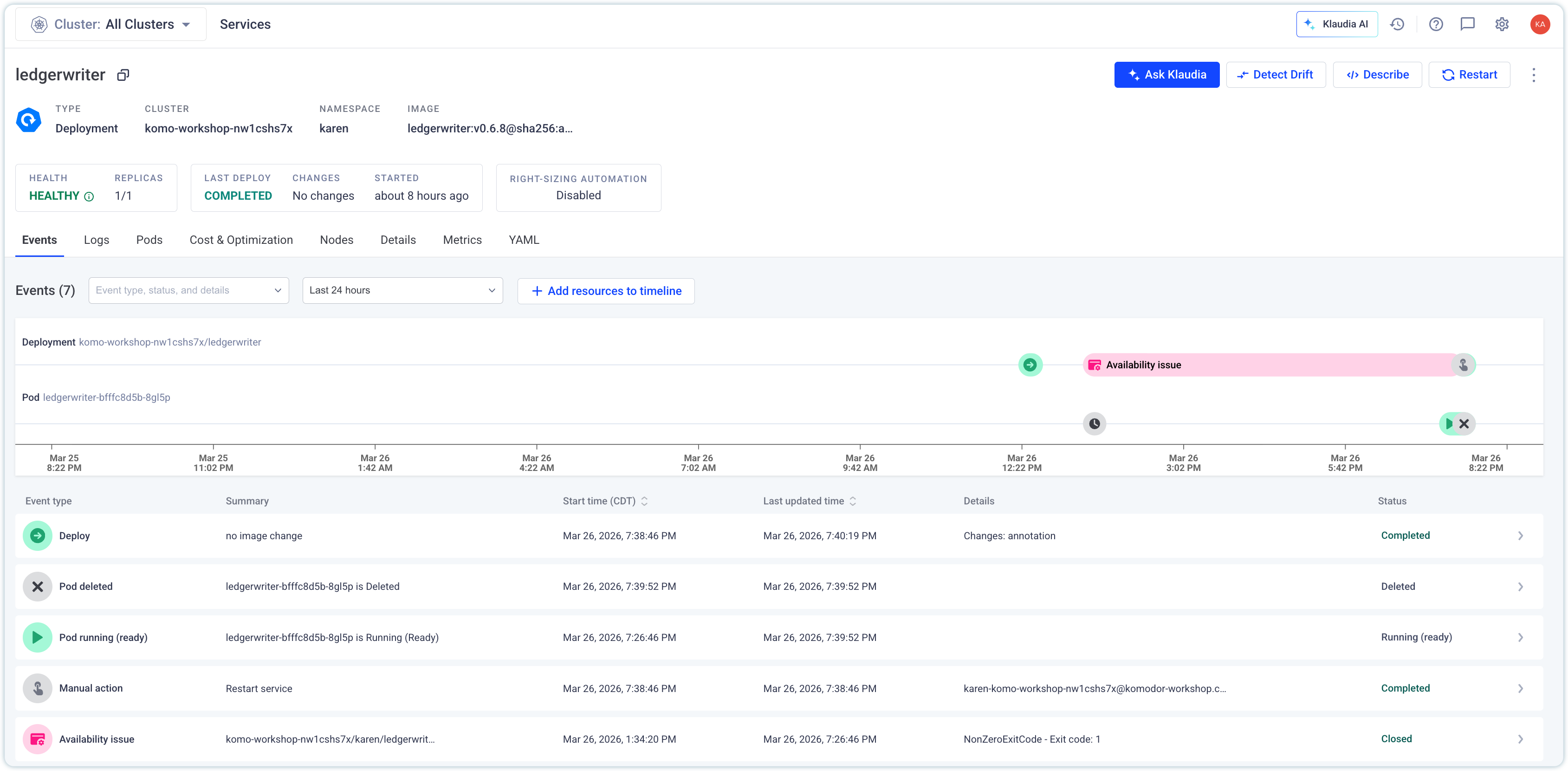 --- class: middle, center ## Komodor Academy Workshops <span class="chapter-slide">Hands-On Exercise 2: Customers not seeing new version of frontend.</span> --- ## Hands-On Exercise 2: Customers not seeing new version of frontend <div style="display: flex; gap: 1rem; align-items: flex-start;"> <div style="flex: 0 0 70%;"> <img class="column-img" src="/static/content/assets/workshops/ai-sre/select-02-frontend.png"> </div> <div style="flex: 0 0 30%;"> <br /> <ul> <li>Navigate back to Jobs, select <i>02-frontend</i></li><br /> <li>As before, run the job in the Job overview</li><br /> <li>After several minutes, check the status of the deployment</li> </ul> </div> </div> --- ## Hands-On Exercise 2: Customers not seeing new version of frontend Cont'd 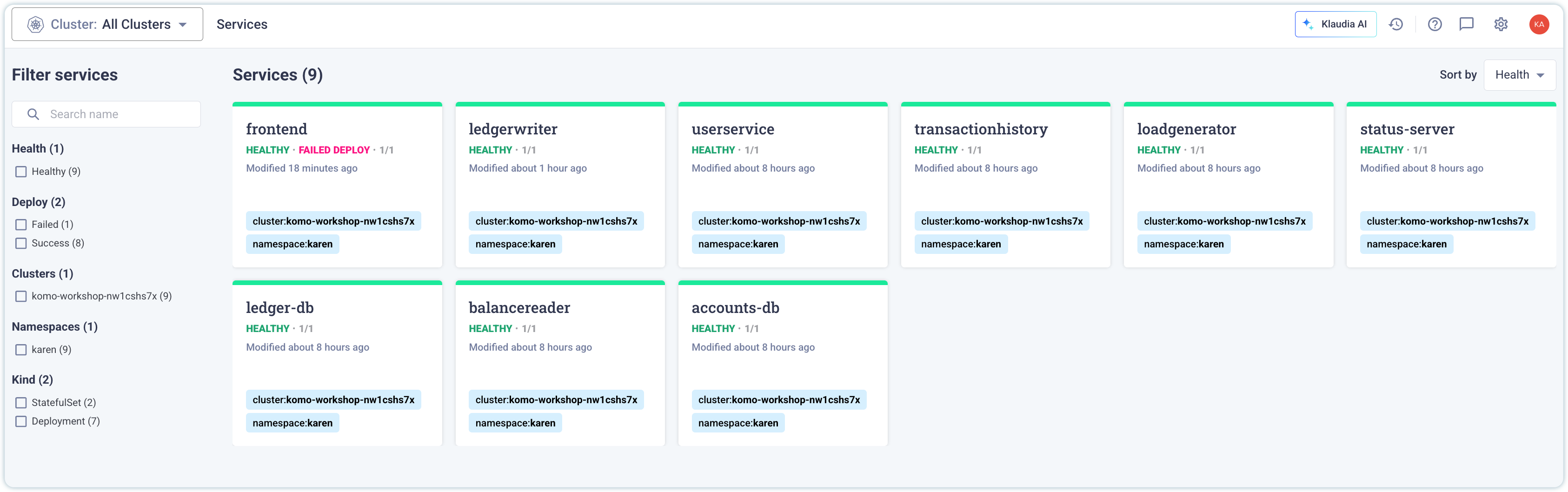 ??? The important thing to note here is the Failed Deploy --- ## Hands-On Exercise 2: Customers not seeing new version of frontend Cont'd 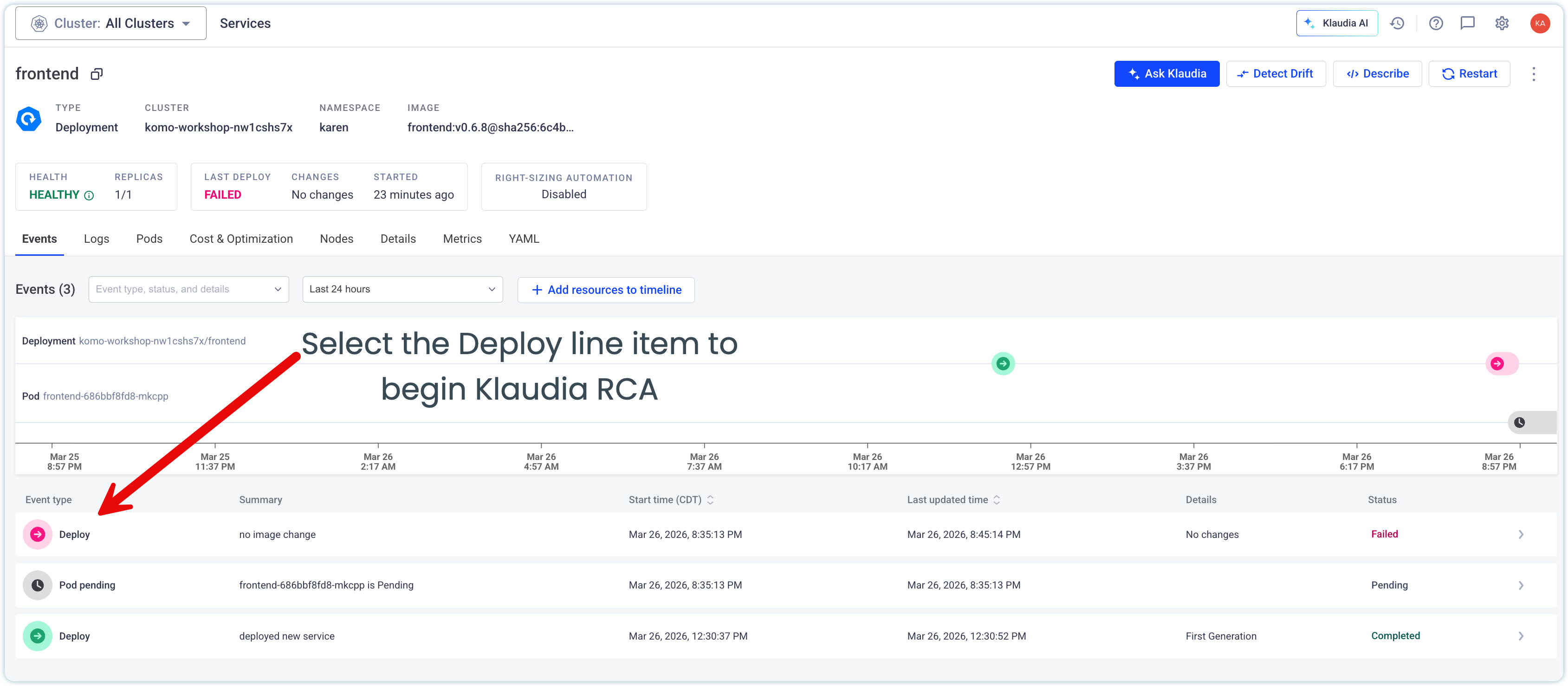 ??? Klaudia isn't just for Availability Events. In fact, this service is still up and running, but the deployment failed. Running Klaudia on a healthy service is possible, and promotes SREs to be proactive about the software they support. --- ## Hands-On Exercise 2: Customers not seeing new version of frontend Cont'd <div style="display: flex; gap: 1rem; align-items: flex-start;"> <div style="flex: 0 0 70%;"> <img class="column-img" src="/static/content/assets/workshops/ai-sre/frontend-node-selector-rca-report.png"> </div> <div style="flex: 0 0 30%;"> <br /> <ul> <li>The Deployment specifies this deployment runs on a specific node</li><br /> <li>This node doesn't exist in the current Kubernetes fleet</li><br /> <li>What does Klaudia suggest we do?</li><br /> </ul> </div> </div> --- ## Hands-On Exercise 2: Customers not seeing new version of frontend Cont'd <div style="display: flex; gap: 1rem; align-items: flex-start;"> <div style="flex: 0 0 70%;"> <img class="column-img" src="/static/content/assets/workshops/ai-sre/frontend-node-selector-remediation.png"> </div> <div style="flex: 0 0 30%;"> <br /> <ul> <li>Klaudia suggests rolling back to the previous revision</li> <li>As before, select Run to rollback. Check the events timeline</li> <li>Bonus points, do you know the name of the node selector? (Hint: 1980s)</li> </ul> </div> </div> --- class: middle, center ## Komodor Academy Workshops <span class="chapter-slide">Hands-On Exercise 3: userservice and accounts-db no longer talking </span> --- ## Hands-On Exercise 3: userservice and accounts-db no longer talking <div style="display: flex; gap: 1rem; align-items: flex-start;"> <div style="flex: 0 0 70%;"> <img class="column-img" src="/static/content/assets/workshops/ai-sre/select-03-accounts-db.png"> </div> <div style="flex: 0 0 30%;"> <br /> <ul> <li>Navigate back to Jobs, select <i>03-accounts-db</i></li><br /> <li>As before, run the job in the Job overview</li><br /> <li>After several minutes, check the status of the deployment</li> </ul> </div> </div> --- ## Hands-On Exercise 3: userservice and accounts-db no longer talking 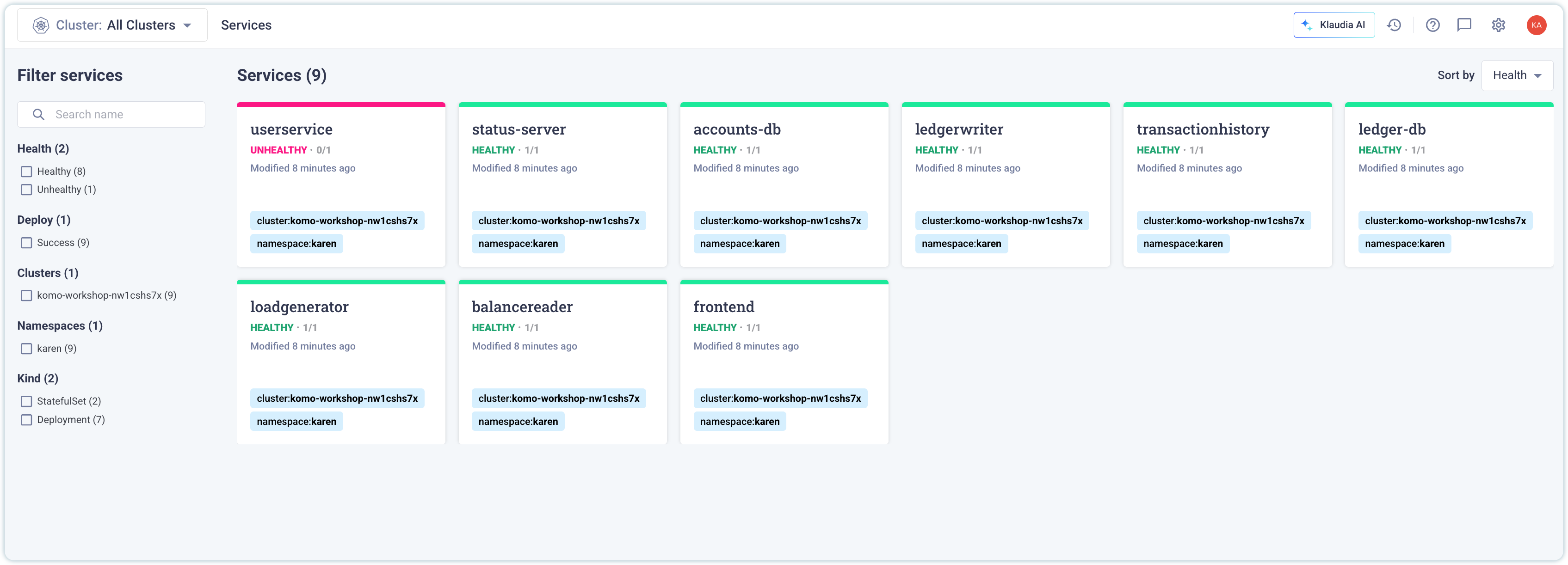 - The `userservice` is unhealthy - We implemented a `NetworkPolicy` - Why did that cause the service to be unhealthy? ??? Teaching about the importance of readiness probes. This is a Kubernetes best practice. --- ## Hands-On Exercise 3: userservice and accounts-db no longer talking 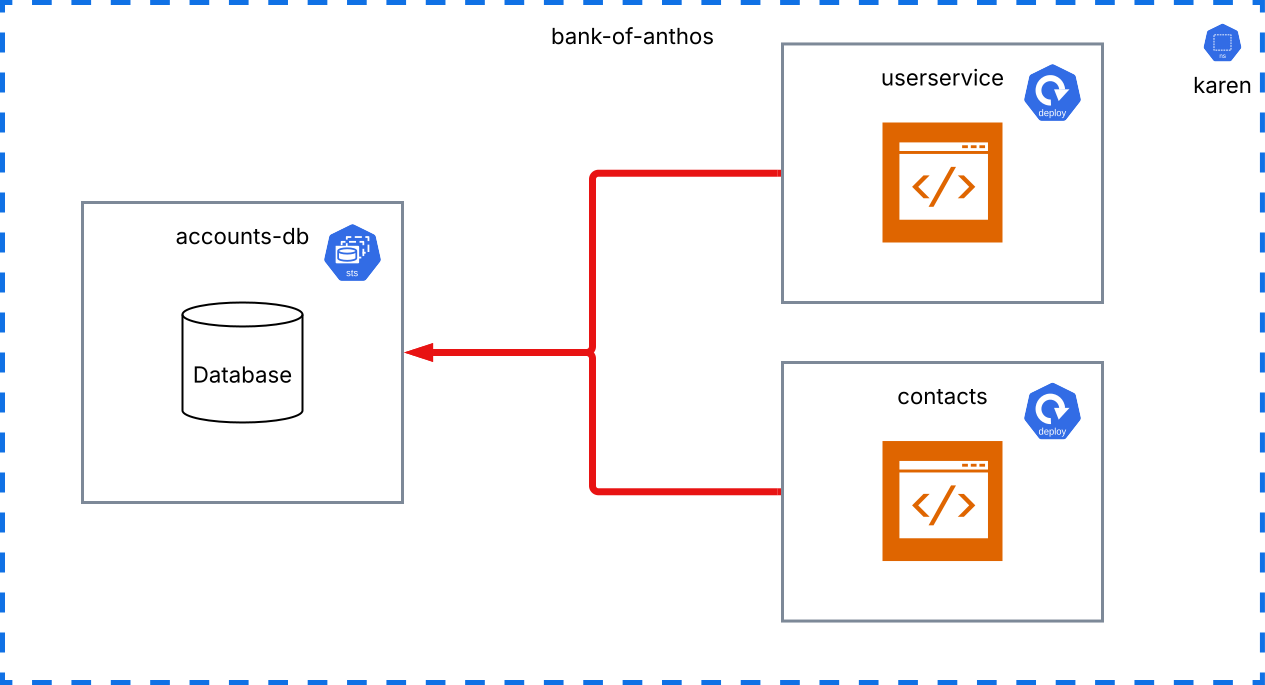 ??? Teaching about the importance of readiness probes. This is a Kubernetes best practice. --- ## Hands-On Exercise 3: userservice and accounts-db no longer talking 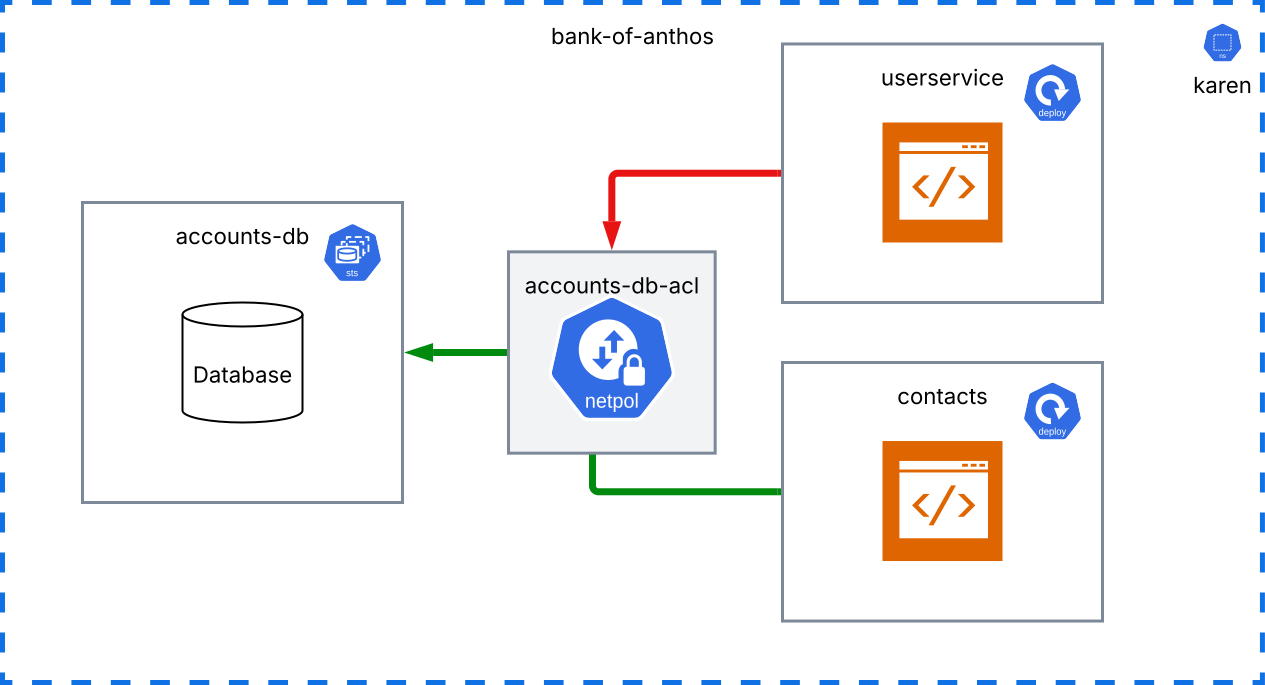 ??? Teaching about the importance of readiness probes. This is a Kubernetes best practice. --- ## Hands-On Exercise 3: userservice and accounts-db no longer talking 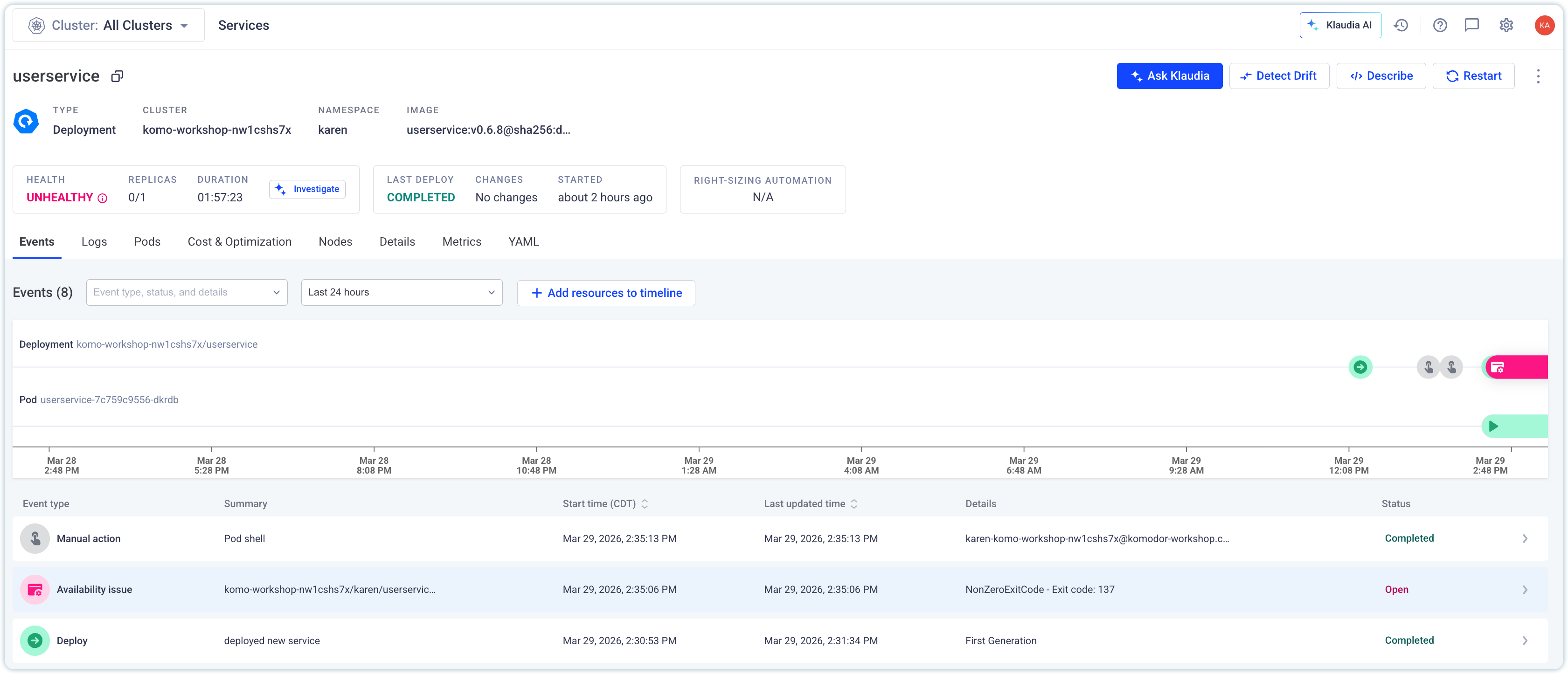 - Select the `Availability issue` to begin automatic Root Cause Analysis - Klaudia observes all changes to the service, including the network policy - Klaudia presents the RCA in 1-2 minutes, with a suggested fix ??? Teaching about the importance of readiness probes. This is a Kubernetes best practice. --- ## Hands-On Exercise 3: userservice and accounts-db no longer talking <div style="display: flex; gap: 1rem; align-items: flex-start;"> <div style="flex: 0 0 70%;"> <img class="column-img" src="/static/content/assets/workshops/ai-sre/netpol-rca.png"> </div> <div style="flex: 0 0 30%;"> <br /> <ul> <li>Klaudia notes the exact time of the Network Policy implementation</li><br /> <li>The Readiness Probe is what helped us discover the implementation of the Network Policy</li><br /> <li>The userservice continues to be down until we correct the error here. What's the fix?</li> </ul> </div> </div> --- ## Hands-On Exercise 3: userservice and accounts-db no longer talking <div style="display: flex; gap: 1rem; align-items: flex-start;"> <div style="flex: 0 0 70%;"> <img class="column-img" src="/static/content/assets/workshops/ai-sre/netpol-remediation.png"> </div> <div style="flex: 0 0 30%;"> <br /> <ul> <li>Klaudia doesn't suggest simply rolling back. She infers that userservice needs to talk to accounts-db</li><br /> <li>The readiness probe is a significant contextual clue on why rolling back isn't the right move</li><br /> <li>We can update the policy here on the cluster. Eventually we'd check this into source control.</li> </ul> </div> </div> ??? Knowledge Base could help point Klaudia to suggest opening a PR in the future. --- ## Hands-On Exercise 3: userservice and accounts-db no longer talking 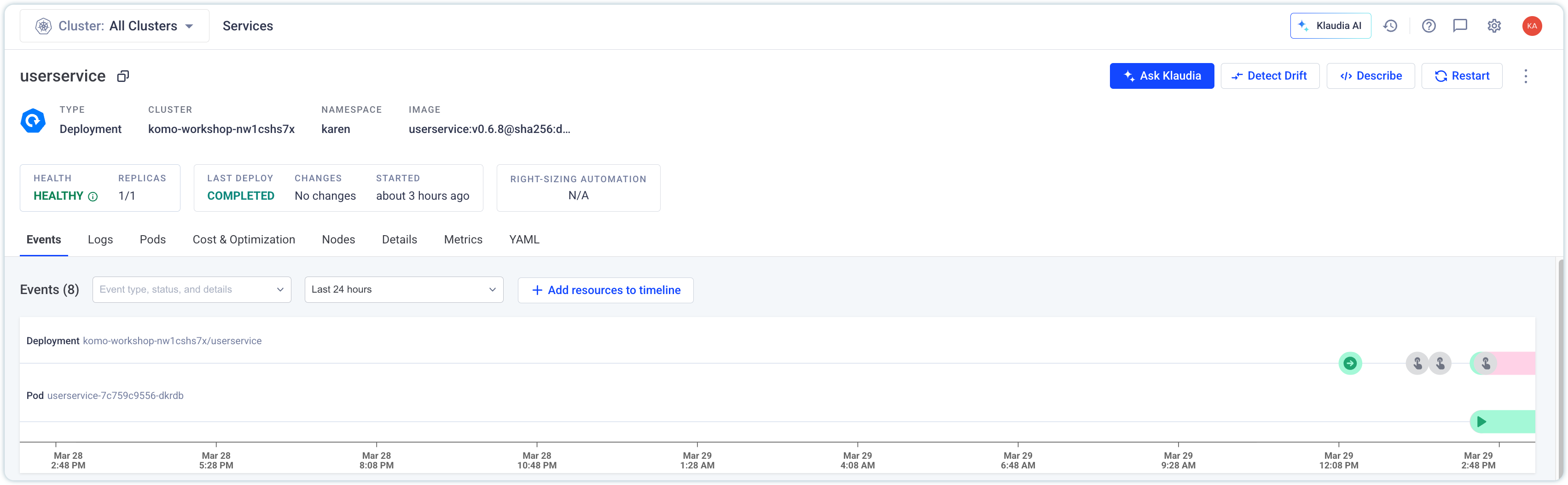 After the NetworkPolicy was patched, the readiness probes now succeeds on the next pod restart. The service regains it's healthy status. ??? Teaching about the importance of readiness probes. This is a Kubernetes best practice. --- class: middle, center ## Komodor Academy Workshops <span class="chapter-slide">Hands-On Exercise 4: What the heck is an OOMKill? </span> --- ## Hands-On Exercise 4: What the heck is an OOMKill? <div style="display: flex; gap: 1rem; align-items: flex-start;"> <div style="flex: 0 0 70%;"> <img class="column-img" src="/static/content/assets/workshops/ai-sre/select-04-contacts.png"> </div> <div style="flex: 0 0 30%;"> <br /> <ul> <li>Navigate back to Jobs, select <i>04-contacts</i></li><br /> <li>As before, run the job in the Job overview</li><br /> <li>After several minutes, navigate to Services to see the failed deployment</li> </ul> </div> </div> --- ## Hands-On Exercise 4: What the heck is an OOMKill? Cont'd 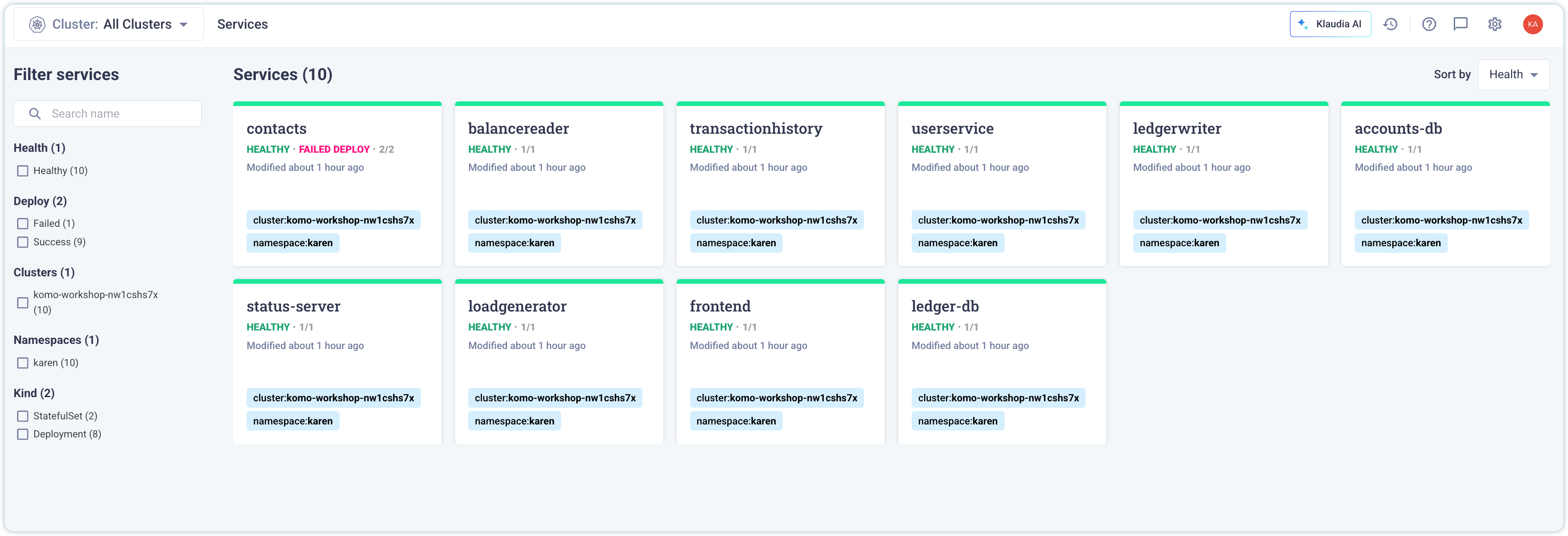 The service appears healthy, but the deployment has failed. The previous pod will remain online, but it's important for us to understand why the contacts service deployment is failing. Navigate into the events timeline, select the `Deploy` event, and start Klaudia RCA. ??? OOMKill notes --- ## Hands-On Exercise 4: What the heck is an OOMKill? <div style="display: flex; gap: 1rem; align-items: flex-start;"> <div style="flex: 0 0 70%;"> <img class="column-img" src="/static/content/assets/workshops/ai-sre/contacts-rca.png"> </div> <div style="flex: 0 0 30%;"> <br /> <ul> <li>The contact's service had memory limits reduced from <code>128mi</code> to <code>64Mi</code></li><br /> <li>The standard Kubernetes exit code for this is <code>137</code></li><br /> <li>The deployment failed, but the previous pods are still running. Resiliency!</li> </ul> </div> </div> --- ## Hands-On Exercise 4: What the heck is an OOMKill? Cont'd <div style="display: flex; gap: 1rem; align-items: flex-start;"> <div style="flex: 0 0 70%;"> <img class="column-img" src="/static/content/assets/workshops/ai-sre/requests_limits.svg"> </div> <div style="flex: 0 0 30%;"> <br /> <ul> <li>A <i>request</i> simply says how much memory/cpu a container could have. It can go higher.</li> <li>A <i>limit</i> tells the kubelet and kernel that this is what the container is bound to, from the perspective of cpu or memory </li> <li>If a container hits the limit, it will either throttle the CPU in the container, or OOMKill the pod because of memory</li> </ul> </div> </div> ??? OOMKill notes --- ## Hands-On Exercise 4: What the heck is an OOMKill? Cont'd <div style="display: flex; gap: 1rem; align-items: flex-start;"> <div style="flex: 0 0 70%;"> <img class="column-img" src="/static/content/assets/workshops/ai-sre/contacts-remediation.png"> </div> <div style="flex: 0 0 30%;"> <br /> <ul> <li>The contact's service had memory limits reduced from <code>128mi</code> to <code>64Mi</code></li><br /> <li>The standard Kubernetes exit code for this is <code>137</code></li><br /> <li>The deployment failed, but the previous pods are still running. Resiliency!</li> </ul> </div> </div> ??? OOMKill notes --- ## Hands-On Exercise 4: What the heck is an OOMKill? Cont'd 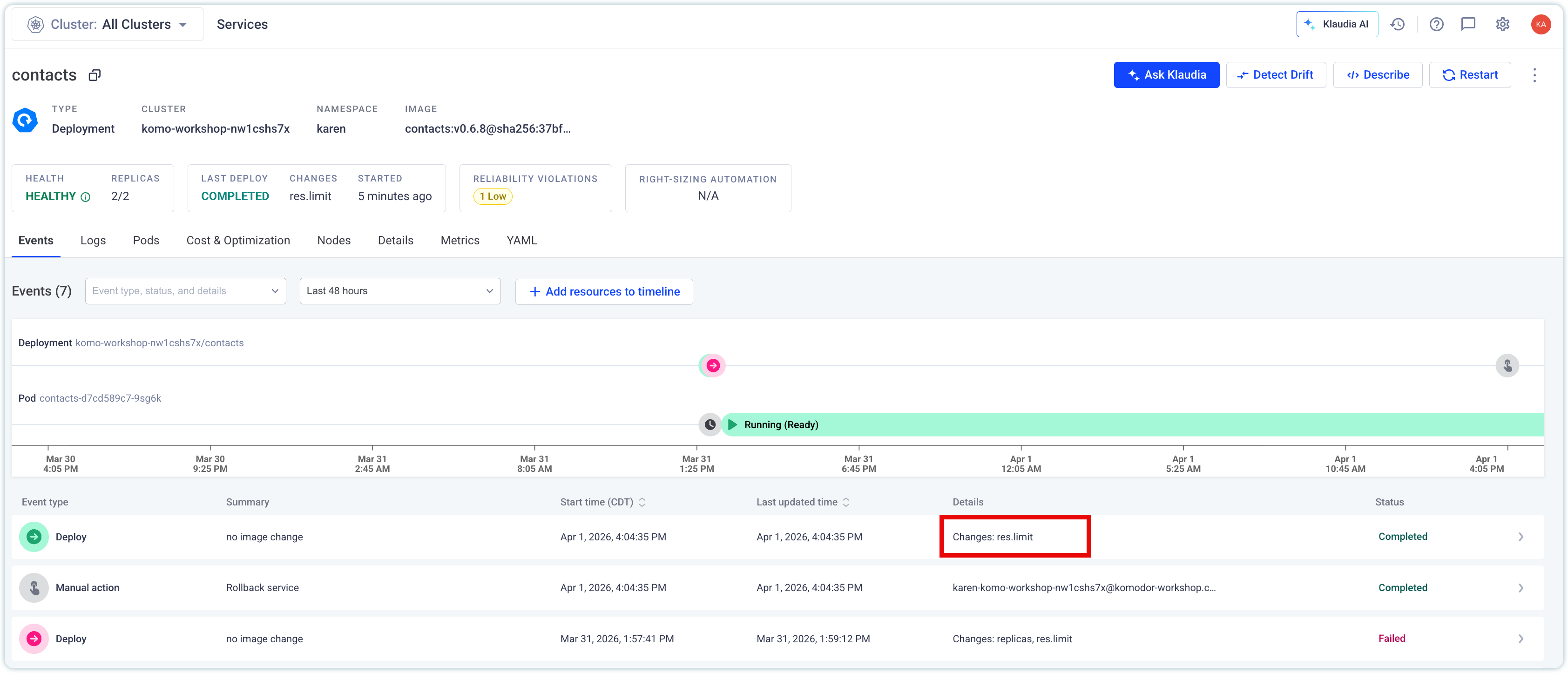 ??? OOMKill notes --- class: middle, center ## Komodor Academy Workshops <span class="chapter-slide">Hands-On Exercise 5: I promise this is the correct version</span> --- ## Hands-On Exercise 5: I promise this is the correct version <div style="display: flex; gap: 1rem; align-items: flex-start;"> <div style="flex: 0 0 70%;"> <img class="column-img" src="/static/content/assets/workshops/ai-sre/select-05-ledgerwriter.png"> </div> <div style="flex: 0 0 30%;"> <br /> <ul> <li>Navigate back to Jobs, select <i>05-ledgerwriter</i></li><br /> <li>As before, run the job in the Job overview</li><br /> <li>After several minutes, check the status of the deployment under Services</li> </ul> </div> </div> --- ## Hands-On Exercise 4: What the heck is an OOMKill? Cont'd  ??? OOMKill notes --- ## Hands-On Exercise 5: I promise this is the correct version <div style="display: flex; gap: 1rem; align-items: flex-start;"> <div style="flex: 0 0 70%;"> <img class="column-img" src="/static/content/assets/workshops/ai-sre/ledgerwriter-rca-image-tag.png"> </div> <div style="flex: 0 0 30%;"> <br /> <ul> <li>Our release pipeline's image tag was incorrect.</li><br /> <li>Klaudia lets us know that a registry wide check confirms this is a tagging problem</li><br /> <li>Our previous container is still running the previous tag, we are safe to rollback</li> </ul> </div> </div> --- ## Hands-On Exercise 5: I promise this is the correct version <div style="display: flex; gap: 1rem; align-items: flex-start;"> <div style="flex: 0 0 70%;"> <img class="column-img" src="/static/content/assets/workshops/ai-sre/ledgerwriter-image-tag-remediation.png"> </div> <div style="flex: 0 0 30%;"> <br /> <ul> <li>Klaudia will rollback the deployment to our current version</li><br /> <li>This will stop the <code>ImagePullBackOff</code> error</li><br /> <li>Select <code>Run</code> to initiate the rollback sequence in Kubernetes</li> </ul> </div> </div> --- ## Hands-On Exercise 4: What the heck is an OOMKill? Cont'd  ??? OOMKill notes --- ## Komodor Academy Workshops <span class="chapter-slide">Thank You!</span>